 Français (France)
 English (UK)
 English (US)
 Deutsch (Deutschland)

Contents
Point your phone at a star and read its name on the screen: every app makes the same promise. What changes is what the app does when you lose cell service, how it protects your eyes in the dark, what it really costs, and what it says it does with your data. Our stargazing guide for beginners mentions an app set to a red filter; here’s what each one offers, listing in hand.
Seven Apps, Read From Their Listings and Publishers’ Pages
We picked seven popular apps from identifiable publishers, all updated in 2026 except one: Stellarium Mobile, SkySafari 8, Star Walk 2 Plus, Sky Tonight, SkyView Lite, Night Sky, and Sky Map. For each, on November 16, 2026, we read the US App Store listing, the US Google Play listing, and the publisher’s own pages. Nothing is scored or ranked: what follows is what publishers and stores display, and it’s attributed to them. When a listing says nothing, the table says so: “not stated,” never “no.”
One app was left out, and it’s the one with the most obvious name. On the US App Store, Star Chart, from Escape Velocity, is still at version 3.98 from November 17, 2015, which requires iOS 7. Its developer hasn’t given Apple any details about its privacy practices [1]. The name matches what you’re searching for; the rest is almost 11 years old. The names around it aren’t much more helpful: the same publisher sells Star Walk 2 Plus: Live Sky Map and Star Walk 2 Pro: Sky Map Live [2, 3], while Open Sky Map is the iPhone version of the original Sky Map [4].
| App (publisher) | Platforms | Price in the US | Offline | Red mode | Declared privacy (App Store) |
|---|---|---|---|---|---|
| Stellarium Mobile (Noctua Software) | iOS, Android; free Stellarium for computers | Free, no ads; Stellarium Plus: $1.99 or $18.99 | Yes, with a reduced catalog | Yes | Precise location, not linked to you |
| SkySafari 8 (Simulation Curriculum) | iOS, Android | Paid: $4.99 to $34.99 on both stores | Yes for the Pro version, according to its guide | Yes | Basic: identifiers and usage, not linked; Plus and Pro: email address linked to you |
| Star Walk 2 Plus (Vito Technology) | iOS, Android | Free with ads; subscription at $0.99 a month, or $5.99 to $9.99 a year | Yes, according to Google Play | Night mode, color not stated | Identifiers and usage “used to track you” |
| Sky Tonight (Vito Technology) | iOS, Android | Free with ads; Premium Access from $0.99 (one month) to $12.99 (lifetime) | Yes, according to Google Play | Night mode, color not stated | Identifiers and usage “used to track you” |
| SkyView Lite (Terminal Eleven) | iOS, Android | Free; two purchases at $0.99 | Yes, with no data signal or GPS | Red or green | Location and identifiers “used to track you” |
| Night Sky (iCandi Apps) | Apple devices only | Free; Night Sky + and Night Sky + Aura subscriptions ($69.99 a year for Aura) | Content already loaded (version 27.2) | Yes | Usage, identifiers, and diagnostics, not linked to you |
| Sky Map (Sky Map Devs, Penterakt) | Android; iPhone since November 7, 2026 | Free, open source, no ads | Yes, according to its help page | Yes | Coarse location and searches, not linked to you |
Sources: US App Store and Google Play listings and publishers’ pages, read on November 16, 2026, and detailed in the numbered sources. Privacy labels are the publishers’ own declarations, not verified by Apple. “Not stated” means neither the publisher nor the store mentions it. Prices as listed, before any sales tax.
Free and Ad-Free: Stellarium Mobile and Sky Map
Stellarium Mobile is made, its listing says, by “the original creator of Stellarium,” the open-source planetarium for computers [5]. The app is free, and its publisher commits to showing no ads; advanced features come with a one-time purchase or a monthly subscription [6], at the $1.99 and $18.99 shown on the US App Store, though the listing doesn’t say which price is which [5]. Offline, it gets by with a reduced dataset of 3 million stars and 2.3 million deep-sky objects, the publisher explains. Good news: its night mode comes with the free version [7]. Google Play describes it as a “night mode (red)” that preserves your eyes’ adaptation to darkness [8]. On a computer, Stellarium stays free and open source [9].
Sky Map has a backstory. Launched at Google in 2009 as Google Sky Map, it’s now open source, free, and ad-free [10, 11], and it just landed on iPhone: the first version, “Open Sky Map,” dates from November 7, 2026, with optional tips [4]. Every permission is optional: decline location and you can enter a place name or coordinates by hand [10]. Its night mode is a red-shifted display that keeps your eyes dark-adapted [11]. And its help page settles the offline question: Sky Map works fully offline, except for satellite data and looking up a place by name [12].
Free With Ads: Star Walk 2, Sky Tonight, and SkyView
Star Walk 2 Plus and Sky Tonight come from the same publisher, Vito Technology, and share the same model: free, with ads, plus subscriptions to remove them [2, 13]. On Google Play, both say they work offline, and both describe a night mode without naming its color [14, 15]. Sky Tonight is the stricter of the two on the App Store: without a subscription, “you can’t see most of the interface items” in Visible Tonight, Calendar, and Search [13]. Its Google Play listing softens that: all objects, constellations, planets, and sky events remain available without Premium [15]. Premium Access runs from $0.99 for a month to $12.99 for life on the US App Store [13].
SkyView Lite, from Terminal Eleven, bets on augmented reality: your camera films the sky, and the app picks out the celestial objects in it, “day or night.” According to its listing, it “does not require a data signal or GPS to function,” [17] and Google Play says it offers red or green night mode filters [18]. One catch: its last update dates from September 23, 2025, on the App Store [17] and October 3, 2025, on Google Play [18], the oldest in the lineup.
Night Sky: A Planetarium for Apple Devices Only
Night Sky, from the British publisher iCandi Apps, lives only in the Apple ecosystem: iPhone, iPad, Mac, Apple Watch, Apple TV, and Vision Pro, with no Android version shown on its website [19]. Free to download, it sells two subscriptions: Night Sky +, which notably opens up 1.7 billion stars “streamed from the cloud,” and Night Sky + Aura, a “personal AI super astronomer,” at $9.99 a week, $17.99 a month, or $69.99 a year [16].
Here’s the detail that changes everything: Aura’s guided tours run on the device when it supports Apple’s own models, but where those aren’t available, or a question needs more in-depth knowledge, “OpenAI provides a fallback,” the listing says [16]. Since version 27.2, previously loaded forecasts and content stay available when your connection drops. Its “intelligent Night Red Mode” comes with a warning if you point the device straight at the Sun [16].
With a Telescope: SkySafari and Stellarium Plus
SkySafari 8, from Simulation Curriculum, is a paid app in three versions whose content climbs fast: according to the publisher’s chart, you go from 120,357 stars in Basic to more than 29 million in Pro, and telescope control, wired or wireless, starts with Plus [20]. The US App Store charges $4.99, $19.99, and $34.99, and the Basic and Pro listings carry the “Contains Advertising” label [21]; Google Play charges the same three prices [22]. An optional Premium subscription can be added to any of them [23], and the Pro version’s guide says it needs no internet [24].
| Version | App Store | Google Play | Stars | Deep-sky objects | Telescope control |
|---|---|---|---|---|---|
| Basic | $4.99 | $4.99 | 120,357 | 222 | No, Plus and Pro only |
| Plus | $19.99 | $19.99 | 2,554,770 | 32,537 | Yes |
| Pro | $34.99 | $34.99 | 29,042,794 | 784,248 | Yes |
Object counts: the publisher’s comparison chart, which also lists 109,446,575 stars with the Pro version’s Gaia extension; the Pro guide, for its part, mentions more than 25 million stars. Prices as shown by the US App Store and Google Play, before any sales tax.
On the Stellarium side, the Plus version drives GoTo telescopes compatible with the NexStar, SynScan, or LX200 protocols, over Bluetooth or Wi-Fi [8]. But don’t count on your phone’s compass to aim the eyepiece: it can easily be off by 10° or more, SkySafari warns, and while it helps you find bright objects, it isn’t accurate enough to point a telescope [25]. Our guide to choosing your first telescope helps you pick the instrument before the app.
How the App Knows Where You’re Pointing
To draw the right patch of sky, an app needs three things, Sky Map’s help sums up: the direction your phone is facing, where you are, and the time. The location comes from GPS or from what you type in, the time from the phone’s clock. Without a location, version 2 of Sky Map puts you in Greenwich, England, and version 1 at 0° latitude and longitude, out in the ocean: from anywhere in the US, the sky will look completely wrong. The telltale sign, according to Sky Map: Polaris near the horizon instead of high in the northern sky [12].
The direction comes from two sensors, Android’s documentation explains: the accelerometer and the magnetic field sensor, in other words the compass [26]. In the calculation described by sensor maker NXP, the accelerometer alone gives the phone’s tilt, unaffected by magnetic interference; the heading comes from the magnetometer [27]. That heading points to magnetic north, which Android can convert to true north with the World Magnetic Model [28]. NOAA’s National Centers for Environmental Information developed the model with the British Geological Survey, and the current version, WMM2025, stays valid until late 2029 [29]; SkyView’s latest Google Play update uses NOAA’s high-resolution version [18]. The gap between the two norths is declination, which our map and compass guide walks through step by step. The gyroscope, finally, tracks rotations closely, but only relative to a starting point: used without the compass, its reference drifts, Android notes [26, 25].
Not sure your phone even has a compass? Sky Map says it needs at least a compass (magnetometer) and an accelerometer, and its Diagnostics page shows any missing sensor as dashes [12].
Why the App’s Map Doesn’t Match the Sky
When the map points beside the real sky, the compass is by far the most common cause, according to Sky Map [12]. Apple warns that the accuracy of the iPhone’s compass “can be affected by magnetic or environmental interference,” and that it’s meant only for basic navigation assistance [30]. Sky Map lists the culprits: metal structures and reinforced concrete, which can deflect the magnetic field by 5 to 30°, car dashboards, full of magnets and motor parts, and magnetic or RFID-blocking phone cases, an “extremely common cause of persistent compass errors.” Even standing on the bleachers at a kid’s game can do it [12].
Then there’s the famous figure 8. Google recommends making one with your phone until the beam narrows and points the right way [31]. The gesture corrects the phone’s own flaws, its magnetized and metal parts, what NXP calls hard iron and soft iron [27, 12]. It can’t do anything about what’s outside: calibrated next to your car, the compass will be wrong with exactly the same confidence [12].
Red Mode Isn’t Always Enough
Why red? In the dark, your eyes rely on rhodopsin, a pigment in the rods that a few seconds of bright light can break down; deep red spares it, but even a bright red light can reduce it, so a dim red light is best [32]. Our stargazing guide explains, in the “Your eyes” step, how long they need to adjust to the dark. It’s also why the National Park Service discourages white flashlights and cell phone lights at star parties and astronomy events [32].
Five apps in the lineup advertise a red mode; Star Walk 2 Plus and Sky Tonight, in their US listings, a night mode with no color given. But even in red, the screen is still too bright for many people, SkySafari admits in its help, which suggests turning down the brightness in your phone’s settings, and better yet placing a piece of red film over the screen, like the Rubylith brand it names: it turns every app red at once [33]. The National Park Service suggests the same low-tech fix for a flashlight: cover it with red cellophane [32].
Your phone can help, too. On an iPhone, Color Filters, under Settings > Accessibility > Display & Text Size, can tint the whole screen “a color of your choosing,” with adjustable intensity, and Reduce White Point tones down the intensity of bright colors. Heads-up: Night Shift automatically removes color filter effects [34]. On Android, Extra dim takes the screen below your phone’s minimum brightness [35], and Night Light on Pixel phones can turn the screen red or amber [36]. These Google pages describe Pixel phones: on another Android phone, look for the equivalent in the display settings.
Your Data: What the Publishers Declare
A stargazing app needs to know where you are. What it does with that location afterward, publishers declare to the stores themselves: on every listing, the App Store notes that this information “has not been verified by Apple,” [5] and Google Play that it comes from the developer, who may update it over time [8].
With that caveat, the differences are clear. Star Walk 2 Plus and Sky Tonight declare identifiers and usage data “used to track you” [2, 13]; SkyView Lite declares the same for location and identifiers [17]. On Google Play, Star Walk 2 Plus says it collects precise location and the list of installed apps, the latter partly for advertising [37]. Stellarium Mobile, on the other hand, declares only precise location on the App Store, for app functionality, not linked to your identity [5]; on Google Play, it says it shares app activity and device IDs for analytics [8]. Sky Map explains that your location is used on the device to draw the sky, that its usage statistics go to Firebase Analytics but can be turned off, and that its F-Droid version sends none [38]. As for the paid version of SkyView, its developer declares it collects no data [39].
One last line is worth a look: on the SkyView Lite listing, the App Store warns that the app “may use your location even when it isn’t open, which can decrease device battery life.” [17] We found no other mention of battery use from the publishers in this lineup.
| If you want to | What the listings say |
|---|---|
| Start without paying or seeing ads | Stellarium Mobile; Sky Map, on Android and now on iPhone |
| Observe far from cell service | Stellarium Mobile, SkyView Lite, Sky Map, SkySafari Pro; on Google Play, Star Walk 2 Plus and Sky Tonight |
| Drive a telescope | SkySafari 8 Plus or Pro; Stellarium Plus |
| Stay with Apple, watch included | Night Sky |
| Share the least data declared on the App Store | SkyView in its paid version, which declares it collects none; Stellarium Mobile, Sky Map |
| Plan the night on a computer | Stellarium, free and open source |
Worth a second look on the day you download: offers and publishers’ declarations change.
In the end, the best app is the one you set up at home: in red, as dim as it goes, the chart already loaded. Out there, it puts a name to a bright dot, then goes back in your pocket. The winter constellations are just waiting for your eyes.
Gear related to this article
No affiliation: no commission, no sponsored products.
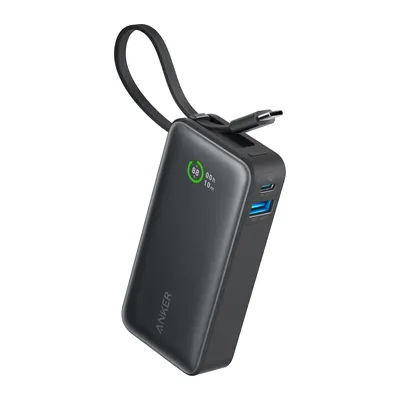
Anker Nano Power Bank 10,000 mAh (A1259)
10,000 mAh power bank with a built-in USB-C cable, one USB-C and one USB-A port, 30 W maximum on USB-C, 7.58 oz. Anker’s page gives neither voltage nor Wh.
View on Amazon (opens in a new tab)
FAQ
Which free stargazing app should I pick?
To start without paying or putting up with ads, Stellarium Mobile and Sky Map are free and ad-free, according to their publishers. Star Walk 2 Plus and Sky Tonight are free too, but show ads and keep part of their features for subscribers. On iPhone, Sky Map has only been available since November 7, 2026, under the name Open Sky Map.
Do stargazing apps work without cell service?
Several say so: Stellarium Mobile, with a catalog cut to 3 million stars, SkyView Lite, which needs neither a data signal nor GPS, Sky Map, according to its help page, and SkySafari Pro. Star Walk 2 Plus and Sky Tonight make the same claim on Google Play. Night Sky keeps forecasts and content already loaded. Either way, test the app in airplane mode before you head out.
Why doesn’t the sky in the app match the real sky?
Most often, it’s your phone’s compass. It can easily be off by 10° or more, according to SkySafari, and the metal in a car, reinforced concrete, or a magnetic case throws it off, according to Sky Map. Step away, take off the case, make a few figure 8s with your phone, and check the location and time zone set in the app.
Is an app’s night mode enough to protect my night vision?
Not always. SkySafari admits that the screen is still too bright for many people, even in its red theme. Turn the brightness all the way down, add a red color filter on iPhone or Extra dim on Android, or even a piece of red film over the screen, and only glance at your phone now and then.
Do these apps collect my location?
They need it to draw your sky, but they don’t all declare the same thing. On the App Store, SkyView Lite declares that location may be used to track you; Stellarium Mobile declares it isn’t linked to your identity; Sky Map says your location only leaves the device to fetch a map picture of the place. These declarations aren’t verified by Apple.
Sources
- App Store (US), Star Chart listing (Escape Velocity), version 3.98 of November 17, 2015, and app privacy, accessed November 16, 2026. apps.apple.com https://apps.apple.com/us/app/star-chart/id345542655 ↩
- App Store (US), Star Walk 2 Plus: Live Sky Map listing (Vito Technology), description, in-app purchases, and app privacy, accessed November 16, 2026. apps.apple.com https://apps.apple.com/us/app/star-walk-2-plus-live-sky-map/id1112481571 ↩
- App Store (US), Star Walk 2 Pro: Sky Map Live listing (Vito Technology), accessed November 16, 2026. apps.apple.com https://apps.apple.com/us/app/star-walk-2-pro-sky-map-live/id892279069 ↩
- App Store (US), Open Sky Map listing (Penterakt), description, version history, and app privacy, accessed November 16, 2026. apps.apple.com https://apps.apple.com/us/app/open-sky-map/id6813336040 ↩
- App Store (US), Stellarium Mobile - Star Map listing (Noctua Software), description, in-app purchases, and app privacy, accessed November 16, 2026. apps.apple.com https://apps.apple.com/us/app/stellarium-mobile-star-map/id1458716890 ↩
- Stellarium Labs, Stellarium Mobile Terms of Use, sections 3 and 5, accessed November 16, 2026. stellariumlabs.com https://stellariumlabs.com/stellarium-mobile-plus/stellarium-mobile-terms-of-use ↩
- Stellarium Labs, Stellarium Mobile and Stellarium Plus, features and comparison of the two versions, accessed November 16, 2026. stellariumlabs.com https://stellariumlabs.com/stellarium-mobile-plus/ ↩
- Google Play (US), Stellarium - Star Map listing (Noctua Software), description and data safety, accessed November 16, 2026. play.google.com https://play.google.com/store/apps/details?id=com.noctuasoftware.stellarium_free&hl=en&gl=US ↩
- Stellarium, free open source planetarium, home page, version 26.3, accessed November 16, 2026. stellarium.org https://stellarium.org/ ↩
- Google Play (US), Sky Map listing (Sky Map Devs), description and app permissions, accessed November 16, 2026. play.google.com https://play.google.com/store/apps/details?id=com.google.android.stardroid&hl=en&gl=US ↩
- Sky Map, The Universe in your Pocket, project home page, accessed November 16, 2026. getskymap.app https://getskymap.app/ ↩
- Sky Map, Help and contact, troubleshooting, “Do I need an internet connection?” and “About phone compasses”, accessed November 16, 2026. getskymap.app https://getskymap.app/help ↩
- App Store (US), Sky Tonight - Stargazing Guide listing (Vito Technology), description, in-app purchases, and app privacy, accessed November 16, 2026. apps.apple.com https://apps.apple.com/us/app/sky-tonight-stargazing-guide/id1570594940 ↩
- Google Play (US), Star Walk 2 Plus: Sky Map View listing (Vito Technology), description, accessed November 16, 2026. play.google.com https://play.google.com/store/apps/details?id=com.vitotechnology.StarWalk2Free&hl=en&gl=US ↩
- Google Play (US), Sky Tonight - Star Gazer Guide listing (Vito Technology), description and Premium Access, accessed November 16, 2026. play.google.com https://play.google.com/store/apps/details?id=com.vitotechnology.sky.tonight.map.star.walk&hl=en&gl=US ↩
- App Store (US), Night Sky listing (iCandi Apps), description, subscriptions, version 27.2, and app privacy, accessed November 16, 2026. apps.apple.com https://apps.apple.com/us/app/night-sky/id475772902 ↩
- App Store (US), SkyView Lite listing (Terminal Eleven), description, version 3.8.11, location notice, and app privacy, accessed November 16, 2026. apps.apple.com https://apps.apple.com/us/app/skyview-lite/id413936865 ↩
- Google Play (US), SkyView Lite listing (Terminal Eleven), description, update date, and latest update notes, accessed November 16, 2026. play.google.com https://play.google.com/store/apps/details?id=com.t11.skyviewfree&hl=en&gl=US ↩
- iCandi Apps, Night Sky 27 - Your Personal Planetarium, home page, accessed November 16, 2026. icandiapps.com https://icandiapps.com/ ↩
- SkySafari Astronomy (Simulation Curriculum), Comparison Chart of the Basic, Plus, and Pro versions, accessed November 16, 2026. skysafariastronomy.com https://skysafariastronomy.com/pages/comparison-chart ↩
- App Store (US), SkySafari listing (Simulation Curriculum), price, in-app purchases, “Contains” section, and app privacy; SkySafari 8 Plus and SkySafari 8 Pro listings linked from the same page, accessed November 16, 2026. apps.apple.com https://apps.apple.com/us/app/skysafari/id1257281849 ↩
- Google Play (US), SkySafari Astronomy listing (Simulation Curriculum), prices of the three versions, accessed November 16, 2026. play.google.com https://play.google.com/store/apps/details?id=com.simulationcurriculum.skysafari7&hl=en&gl=US ↩
- SkySafari Astronomy (Simulation Curriculum), home page, versions, and Premium membership, accessed November 16, 2026. skysafariastronomy.com https://skysafariastronomy.com/ ↩
- Simulation Curriculum, SkySafari Pro 8 Help, guide home page, accessed November 16, 2026. userguide.skysafariastronomy.com https://userguide.skysafariastronomy.com/ ↩
- Simulation Curriculum, SkySafari Pro 8 Help, Compass And AR Help, accessed November 16, 2026. userguide.skysafariastronomy.com https://userguide.skysafariastronomy.com/app-specific/compass-and-ar-help ↩
- Android Developers, Position sensors, last updated October 28, 2026, accessed November 16, 2026. developer.android.com https://developer.android.com/develop/sensors-and-location/sensors/sensors_position ↩
- NXP (Freescale Semiconductor), Mark Pedley, application note AN4246, Calibrating an eCompass in the Presence of Hard- and Soft-Iron Interference, revision 4.0, November 2015, PDF, accessed November 16, 2026. nxp.com https://www.nxp.com/docs/en/application-note/AN4246.pdf ↩
- Android Developers, reference for the GeomagneticField class, accessed November 16, 2026. developer.android.com https://developer.android.com/reference/android/hardware/GeomagneticField ↩
- NOAA National Centers for Environmental Information, World Magnetic Model (WMM), accessed November 16, 2026. ncei.noaa.gov https://www.ncei.noaa.gov/products/world-magnetic-model ↩
- Apple, iPhone User Guide, Use the compass on iPhone, accessed November 16, 2026. support.apple.com https://support.apple.com/guide/iphone/compass-iph1ac0b663/ios ↩
- Google Maps Help, Find & improve your location’s accuracy in Google Maps, Android phone and tablet, accessed November 16, 2026. support.google.com https://support.google.com/maps/answer/2839911?hl=en&co=GENIE.Platform%3DAndroid ↩
- National Park Service, Jim O’Connor (Tucson Amateur Astronomy Association), Dark Adaptation of the Human Eye and the Value of Red Flashlights, last updated March 1, 2021, accessed November 16, 2026. nps.gov https://www.nps.gov/articles/dark-adaptation-of-the-human-eye-and-the-value-of-red-flashlights.htm ↩
- Simulation Curriculum, SkySafari Pro 8 Help, Night Vision Help, accessed November 16, 2026. userguide.skysafariastronomy.com https://userguide.skysafariastronomy.com/app-specific/night-vision-help ↩
- Apple, iPhone User Guide, Change display colors on iPhone to make it easier to see what’s onscreen, accessed November 16, 2026. support.apple.com https://support.apple.com/guide/iphone/change-display-colors-iph3e2e1fb0/ios ↩
- Android Accessibility Help, Change text & display settings, “Dim your screen”, accessed November 16, 2026. support.google.com https://support.google.com/accessibility/android/answer/11183305?hl=en ↩
- Pixel Phone Help, Change your screen color at night on a Pixel phone, accessed November 16, 2026. support.google.com https://support.google.com/pixelphone/answer/7169926?hl=en ↩
- Google Play (US), Star Walk 2 Plus: Sky Map View, data safety page, accessed November 16, 2026. play.google.com https://play.google.com/store/apps/datasafety?id=com.vitotechnology.StarWalk2Free&hl=en&gl=US ↩
- Sky Map, Privacy policy, usage statistics and location, accessed November 16, 2026. getskymap.app https://getskymap.app/privacy ↩
- App Store (US), SkyView listing (Terminal Eleven), paid version, app privacy, accessed November 16, 2026. apps.apple.com https://apps.apple.com/us/app/skyview/id404990064 ↩

Trail running, snow, water, nature and destinations
Nolwenn covers trail running, snow, water, nature and destinations for Outfarer. Curious about everything, from meteor showers to night-train schedules, she has a knack for digging up the one detail that changes everything, and nailing it in a single sentence.


 Julien de Jurquet